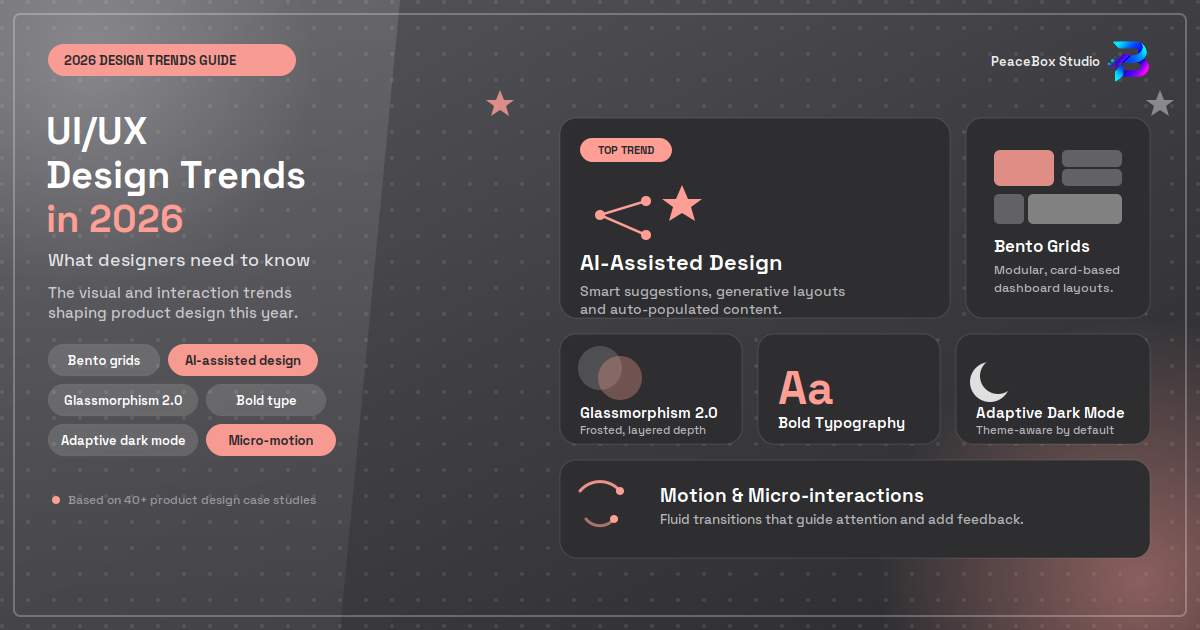
The digital design landscape is changing rapidly, and UI/UX design trends in 2026 are becoming more focused on usability, personalization, accessibility, and intelligent digital experiences. Users expect websites and mobile apps to be fast, intuitive, visually appealing, and easy to navigate across every device.
For UI/UX designers, keeping up with emerging trends is essential for creating products that are both attractive and practical.
In this guide, we explore the top UI/UX design trends for 2026 and how designers can use them to create better digital experiences.
What Is UI/UX Design?
UI (User Interface) design focuses on the visual elements of a digital product, including colors, typography, buttons, icons, layouts, and animations.
UX (User Experience) design focuses on how users interact with a product and how easily they can accomplish their goals.
Together, UI and UX design help create digital products that are visually appealing, functional, accessible, and user-friendly.
Top UI/UX Design Trends in 2026
1. AI-Powered User Experiences
Artificial intelligence is becoming an important part of modern digital products. In 2026, designers are increasingly creating interfaces that adapt to user behavior and provide personalized experiences.
AI can help power:
- Personalized content recommendations
- Smart search
- AI assistants and chatbots
- Predictive interfaces
- Automated workflows
- Personalized dashboards
However, designers should make AI features understandable and give users enough control over automated decisions.
2. Minimalist and Purposeful Interfaces
Minimalism continues to influence modern UI design, but the focus is shifting from simply removing visual elements to creating purposeful interfaces.
Modern designs often use:
- Clean layouts
- Clear typography
- Generous whitespace
- Simple navigation
- Strong visual hierarchy
- Focused calls to action
A good minimalist interface removes unnecessary complexity without removing useful information.
3. Personalization in UX Design
Users increasingly expect digital products to adapt to their needs.
Personalized UX can include customized dashboards, recommendations, onboarding experiences, content, and notifications.
For example, a productivity application might display frequently used tools first, while an e-commerce platform can recommend products based on previous interactions.
The key is to make personalization helpful rather than intrusive.
4. Microinteractions and Meaningful Motion
Small animations can make an interface feel more responsive and engaging.
These microinteractions can appear when users:
- Click a button
- Complete a form
- Receive a notification
- Upload a file
- Switch between screens
- Complete an action
In 2026, motion design should have a purpose. Animations should provide feedback, guide attention, or explain changes rather than simply decorate the interface.
5. Accessibility-First Design
Accessibility is becoming an increasingly important part of professional UI/UX design.
Designers should consider users with different visual, motor, auditory, and cognitive needs.
Important accessibility practices include:
- Sufficient color contrast
- Readable typography
- Keyboard-friendly navigation
- Clear labels
- Descriptive alternative text
- Visible focus states
- Simple and consistent navigation
Designing for accessibility can also improve usability for everyone.
6. Responsive and Adaptive Design
Users access digital products through smartphones, tablets, laptops, desktops, and other devices.
Responsive design ensures that layouts adapt to different screen sizes, while adaptive experiences can adjust content and functionality based on the user's context.
Designers should test layouts across multiple screen sizes rather than designing only for one device.
7. Advanced Prototyping in Figma
Tools such as Figma continue to play an important role in modern UI/UX workflows.
Designers can create high-fidelity prototypes to demonstrate interactions, transitions, navigation, and user flows before development begins.
A strong prototype can help teams:
- Test ideas
- Identify usability problems
- Communicate with developers
- Collect stakeholder feedback
- Reduce unnecessary development work
For beginners, learning Figma remains a valuable skill for building a foundation in UI/UX design.
8. Design Systems and Consistency
As digital products become more complex, design systems are becoming increasingly important.
A design system can contain reusable:
- Buttons
- Forms
- Cards
- Icons
- Typography styles
- Color tokens
- Navigation components
Using reusable components improves consistency and can make collaboration between designers and developers more efficient.
9. Voice and Conversational Interfaces
Interfaces are no longer limited to traditional screens.
Voice assistants, conversational AI, and chat-based interfaces are creating new ways for users to interact with digital products.
UX designers need to think beyond visual layouts and consider how conversations should flow, how errors are handled, and how users can recover from misunderstandings.
10. Immersive and 3D Experiences
3D elements, interactive graphics, and immersive experiences are becoming more common in websites, applications, games, and digital products.
When used appropriately, 3D can help users understand products, visualize spaces, or create memorable experiences.
However, performance should remain a priority. Heavy visual effects should not make a website slow or difficult to use.
How Designers Can Prepare for UI/UX Trends in 2026
Following trends is useful, but designers should not adopt every new visual style simply because it is popular.
Instead, focus on developing fundamental skills such as
- User research
- Wireframing
- Information architecture
- Interaction design
- Prototyping
- Usability testing
- Accessibility
- Design systems
- Responsive design
- Visual design
Tools will continue to evolve, but strong UX principles remain valuable regardless of the technology being used.
Final Thoughts
The UI/UX design trends of 2026 are moving toward smarter, more personalized, accessible, responsive, and interactive digital experiences.
AI-powered interfaces, purposeful minimalism, microinteractions, accessibility, personalization, design systems, advanced prototyping, and immersive experiences are shaping the future of digital design.
For designers, the goal should not simply be to follow trends. The most successful designs combine visual quality, usability, accessibility, performance, and user needs.
If you are beginning your UI/UX journey, start with the fundamentals and gradually explore modern tools such as Figma. Understanding why a design works is ultimately more valuable than simply knowing what looks trendy.